App Store Experiment - Screenshot A/B Testing with Product Page Optimization (PPO)
One short email when I publish. No spam, unsubscribe anytime.
If you haven’t already, I recommend reading the reboot post first.
TLDR; In 2013 I made a 7 Minute Workout app in a night, grew it to 2.3m downloads, sold it, got it back, and now I’m trying to see if the old App Store Experiment approach still works in 2026.
The first thing I wanted to attack was screenshots. They’re one of the few things you can change in the App Store that almost every visitor sees. They’re also one of those things everyone has very confident opinions about.
I definitely had confident opinions. Then I tested them.
This post is about using Product Page Optimization in App Store Connect to test screenshots, why Apple’s confidence numbers are painfully slow for apps that aren’t massive, and how I’m trying to make faster decisions without completely kidding myself.
The Methodology
Product Page Optimization (PPO) is Apple's built-in A/B testing tool to test screenshots, icons and app previews for the App Store. A great way to test screenshots without uploading a new build and hoping for the best.
In theory, it’s perfect. You make a few screenshot variants, Apple splits the traffic, and then tells you which one won.
In practice, Apple is very patient. Much more patient than me.
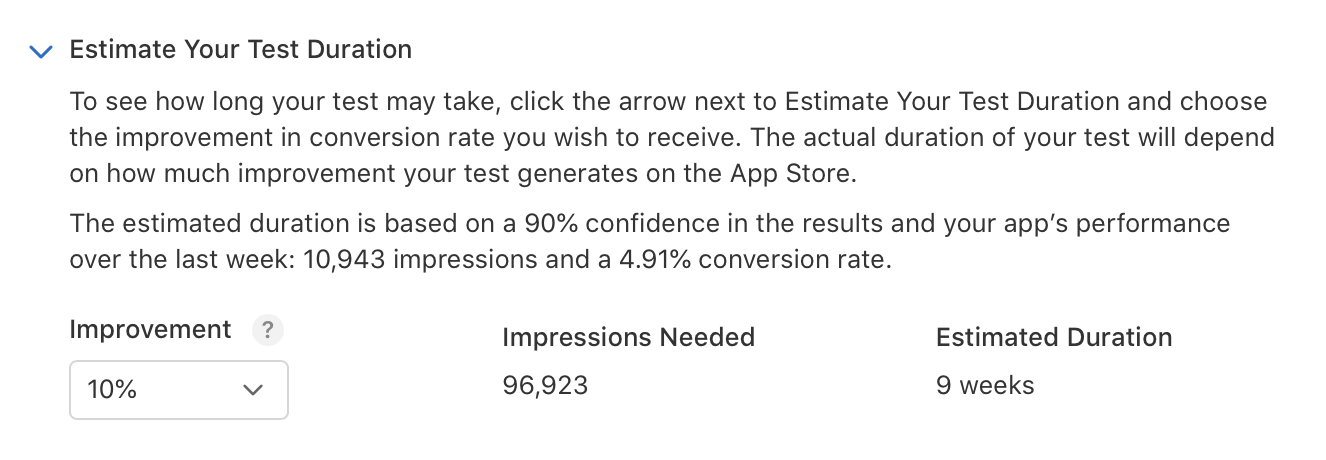
For 7 Minute Workout, Apple recently estimated the test duration using 10,943 impressions in the previous week and a 4.91% conversion rate. To detect a 10% improvement, it wanted 96,923 impressions. Around 9 weeks.
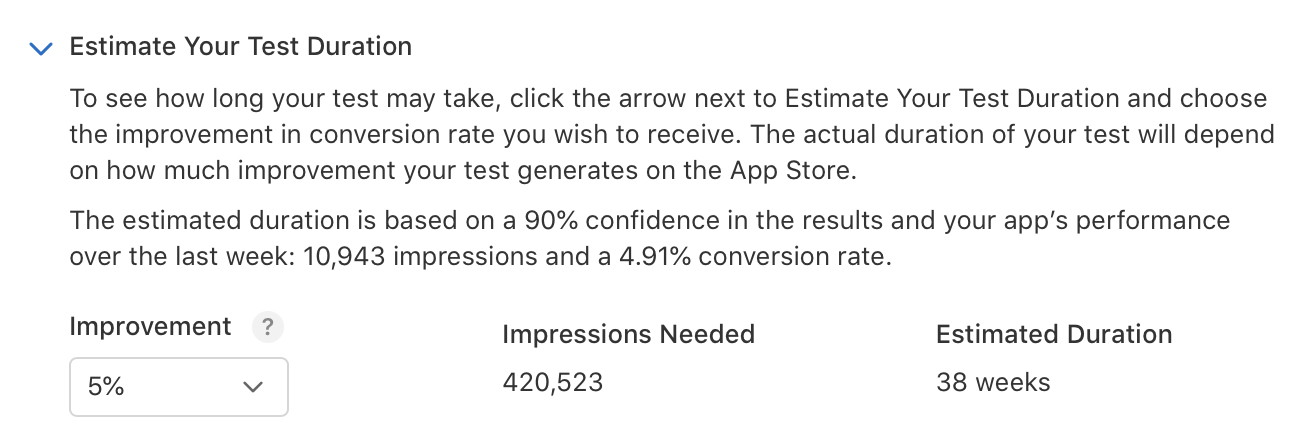
A 5% improvement would still be great. I would absolutely take 5%.
Apple helpfully told me that would need 420,523 impressions. Around 38 weeks.
38 weeks! For one screenshot test. Hard pass from me.
I admire the statistical purity, but I get impatient waiting 24 hours for a review. I am not spending most of a year waiting to find out if one screenshot is slightly less bad than another. Apple is solving for statistical certainty. Most developers should be focusing on solving for speed.
So I needed a faster rule. Not perfect. Just useful enough to stop me wasting months staring at a line that clearly isn’t going anywhere.
The 2K Impression Rule: How I Actually Run Screenshot Variant Tests
I’ve run a lot of Product Page Optimization tests now. After a while I started noticing the same pattern.
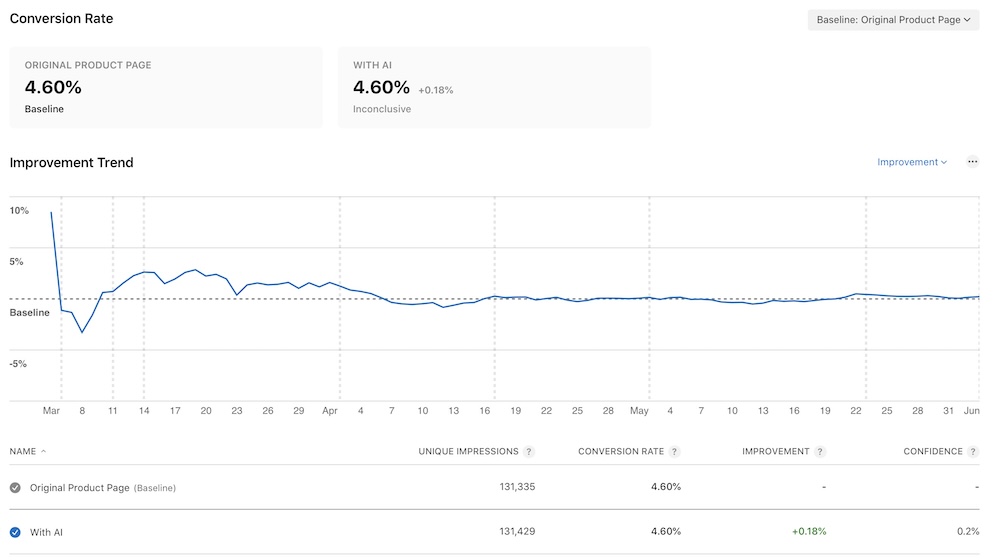
The first few days are noisy. Sometimes wildly noisy. Then, after around 2k unique impressions per variant, most tests seem to tell you what they are.
Sometimes that means going nowhere:
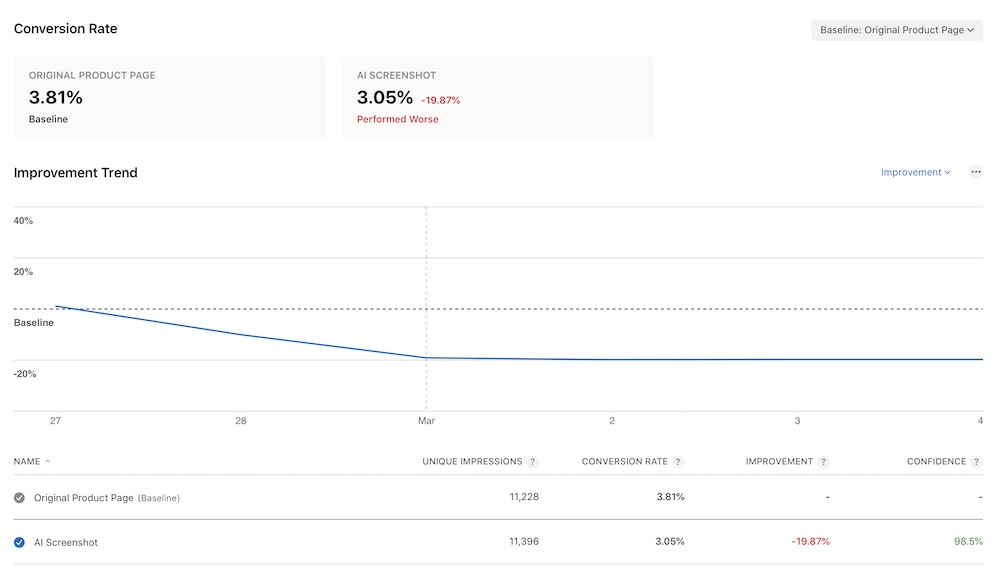
Sometimes it’s obviously bad:
And sometimes it’s obviously good:
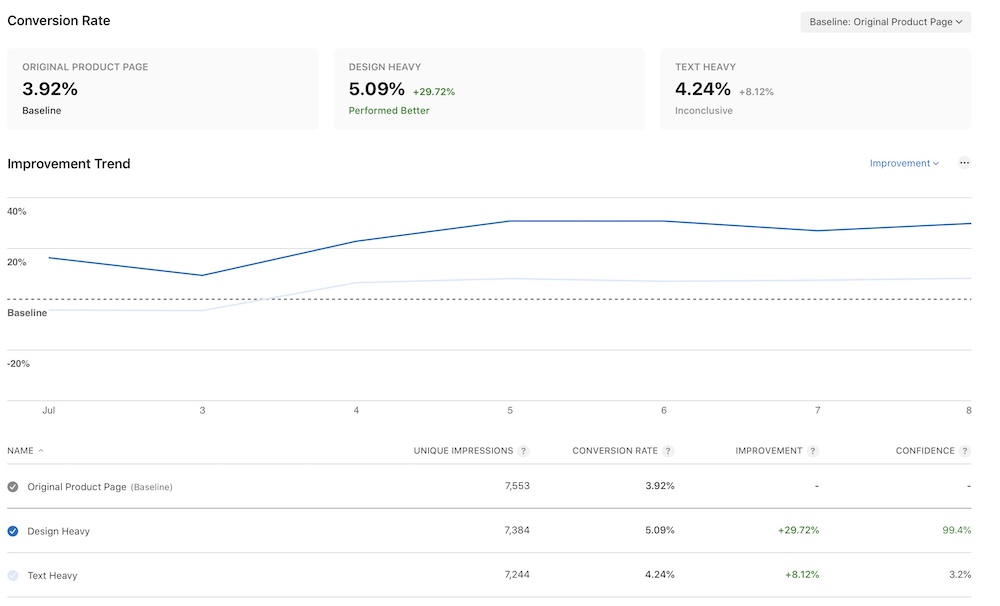
The line will still wiggle. Apple may still call the result inconclusive. But a lot of the time the answer is sitting there anyway.
Of course, this could have just been me seeing what I wanted to see.
So I went back through a bunch of tests, across 5 different apps, and compared the approximate result at ~2k impressions with where they finally landed.
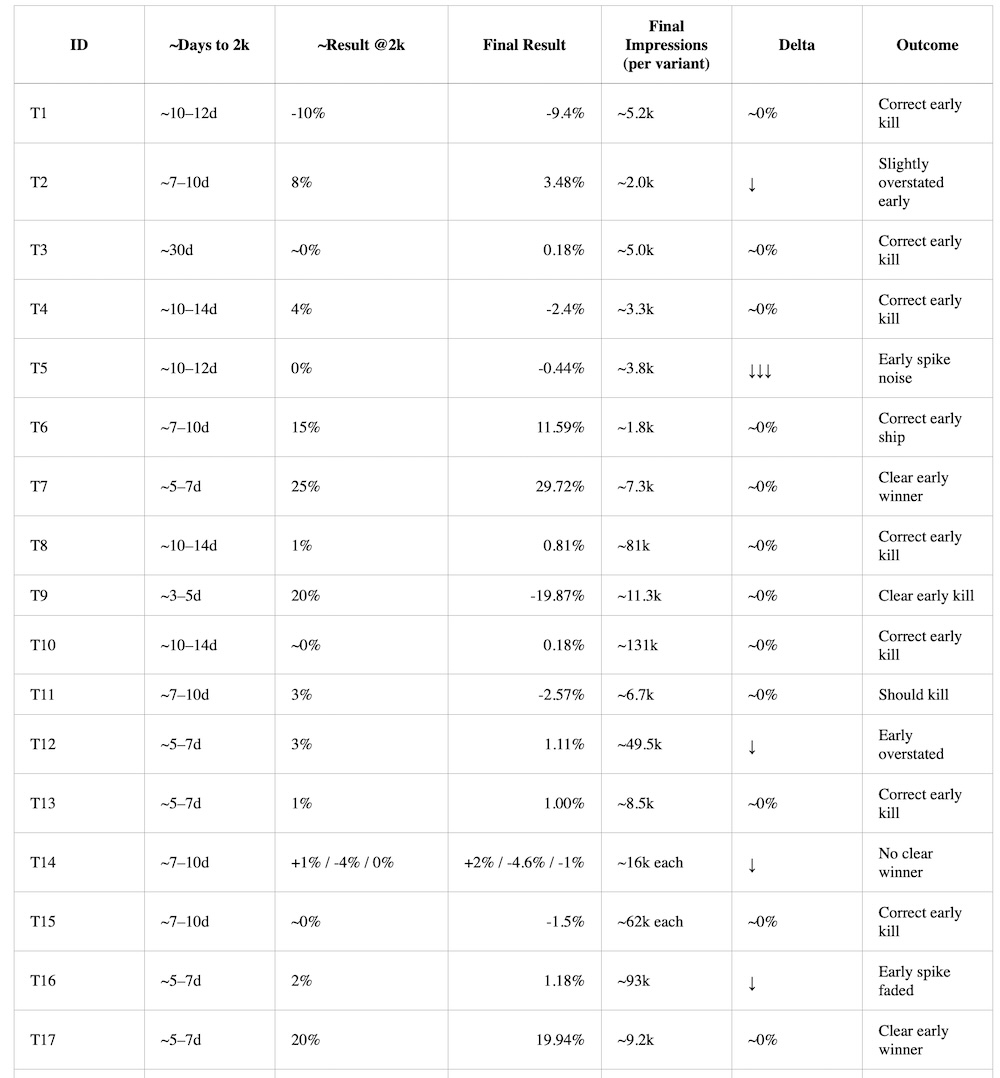
This isn’t science. There are only 17 tests here, the products and traffic mix changed, and the final impression counts vary a lot. Please don’t cite this in your PhD.
But it was enough for me to make a rule I could actually use.
Decision Framework for Screenshot A/B Testing (PPO)
After ~2k variant impressions, I now decide whether to ship or kill a screenshot test.
- +15% → SHIP
- +5% to +15% → LIKELY SHIP
- -5% to +5% → KILL
- < -5% → KILL FAST
The point is not that 2k impressions gives a statistically perfect answer. It doesn’t.
The point is that I have more ideas than traffic. If a screenshot test is up 1%, or down 2%, I would rather move on than burn another 4-8 weeks confirming that nothing happened.
There are exceptions. If it’s a big strategic change, seasonal traffic, or the result is sitting right near a threshold, I’ll let it run longer. But most of the time I’m trying to keep the queue moving.
Tests From This Year
Here are five screenshot tests I’ve run this year for 7 Minute Workout. Some I thought were going to be obvious winners. They were not. I'm pretty effective at proving myself wrong.
Test 1: AI Screenshot
First up, AI.
Everyone is slapping AI on everything, so naturally I wondered if putting it in the screenshots would help.
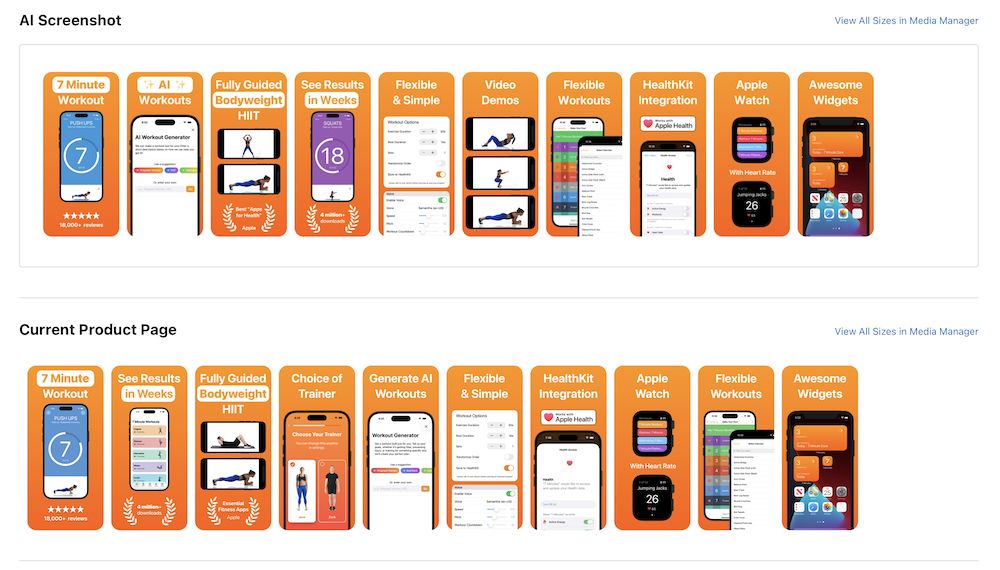
It did not. It finished down -19.87% with 98.5% confidence.
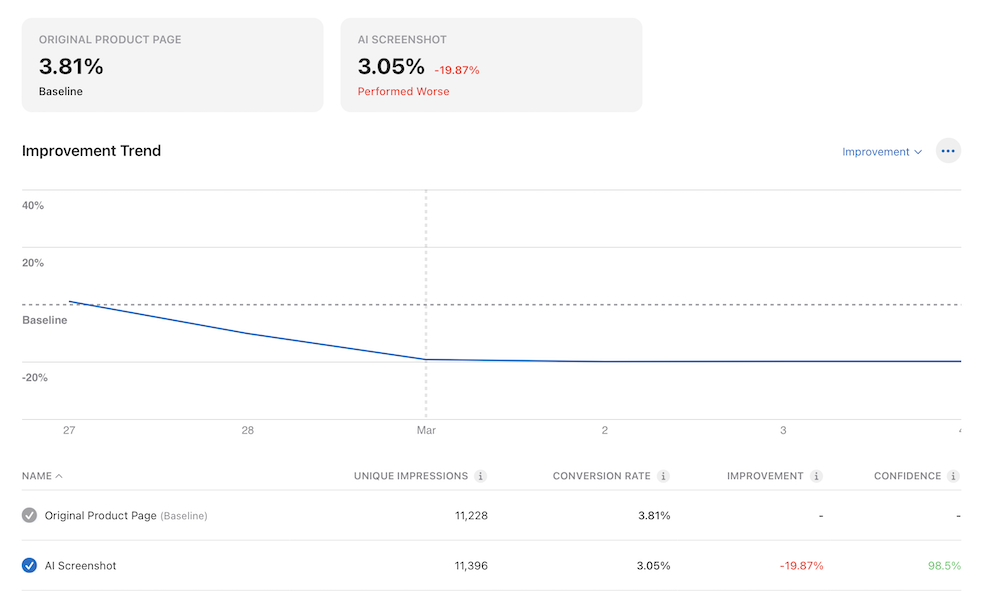
A big fail. This is exactly why I like testing. “Add AI to the screenshots” sounds like an obvious 2026 idea. For this app, users hated it.
Test 2: A Different Design
Next I tried a different design direction. Same basic app promise, but more direct, more text heavy, and a bit more shouty.
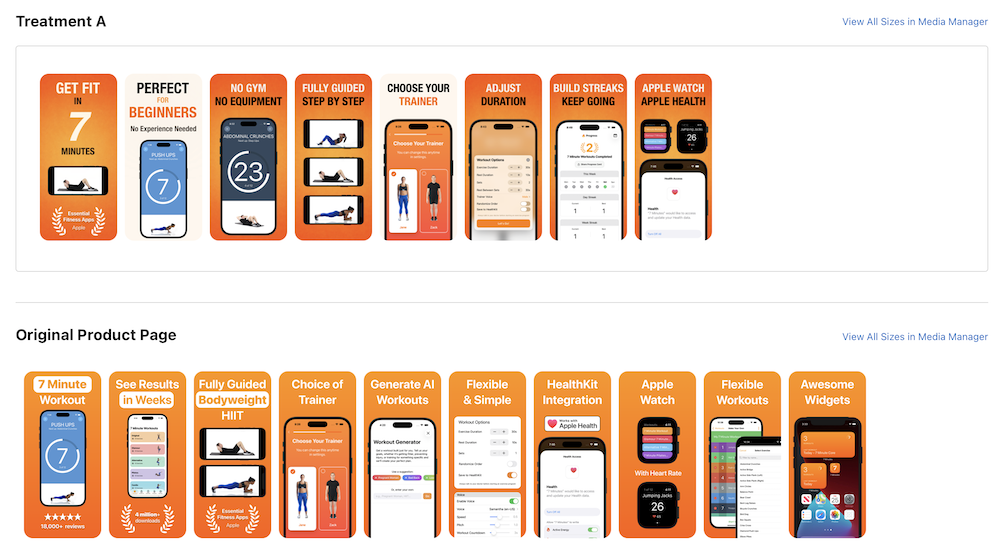
It jumped around early, gave me a little hope, then finished at +1.21% with almost no confidence.
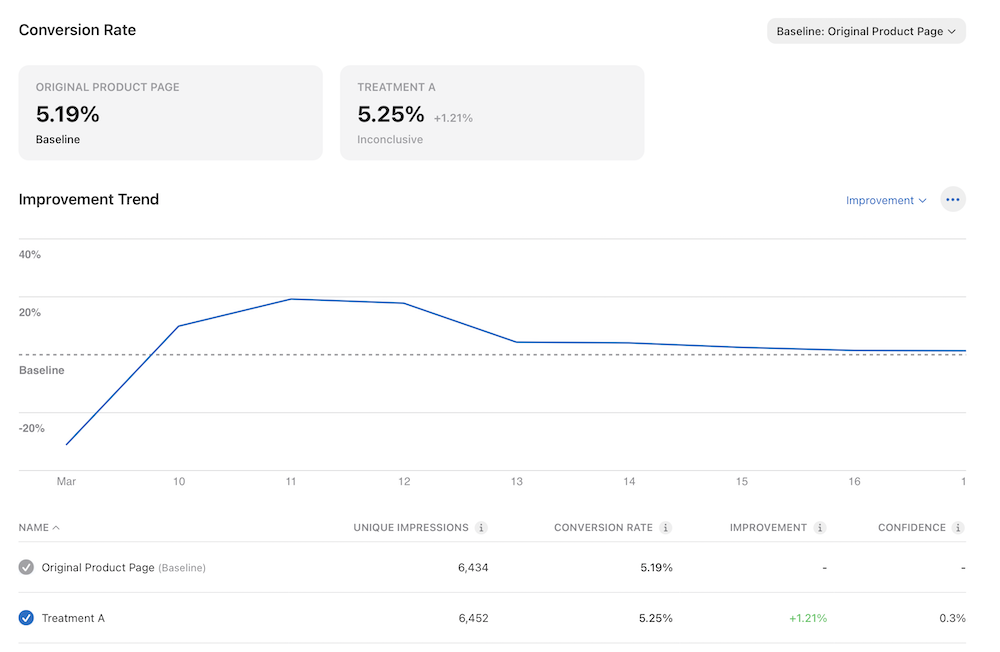
Using the 2k rule, that’s a kill. Not because it was awful. Because “not awful” is not a reason to ship.
Test 3: Paying A Professional
If you spend any time on LinkedIn (I don't recommend it) you'll see a lot of people shouting about their amazing prowess in skyrocketing conversion rates by redesigning screenshots. So, I paid a professional screenshot designer.
If screenshots matter, surely paying someone who does screenshots all day should help.
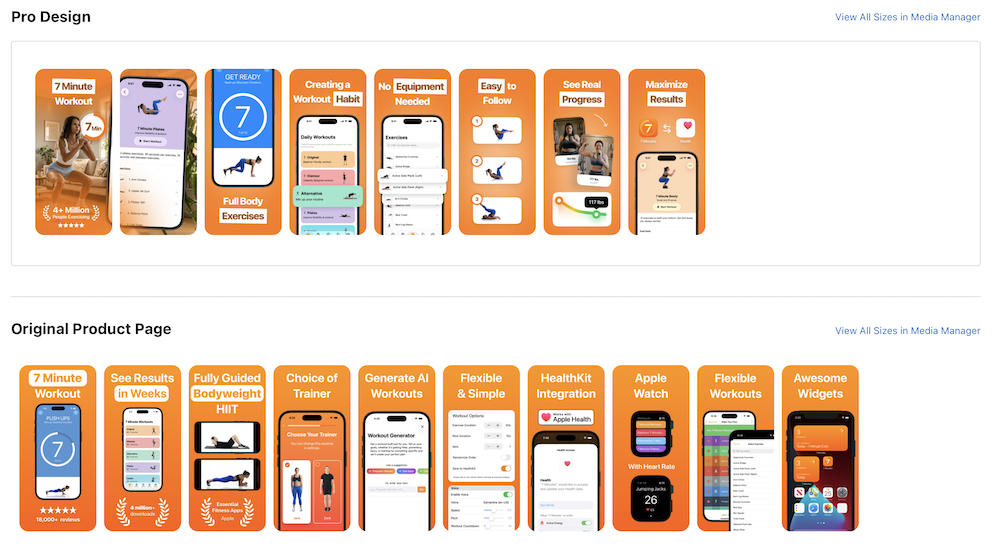
The result: -1.44%.
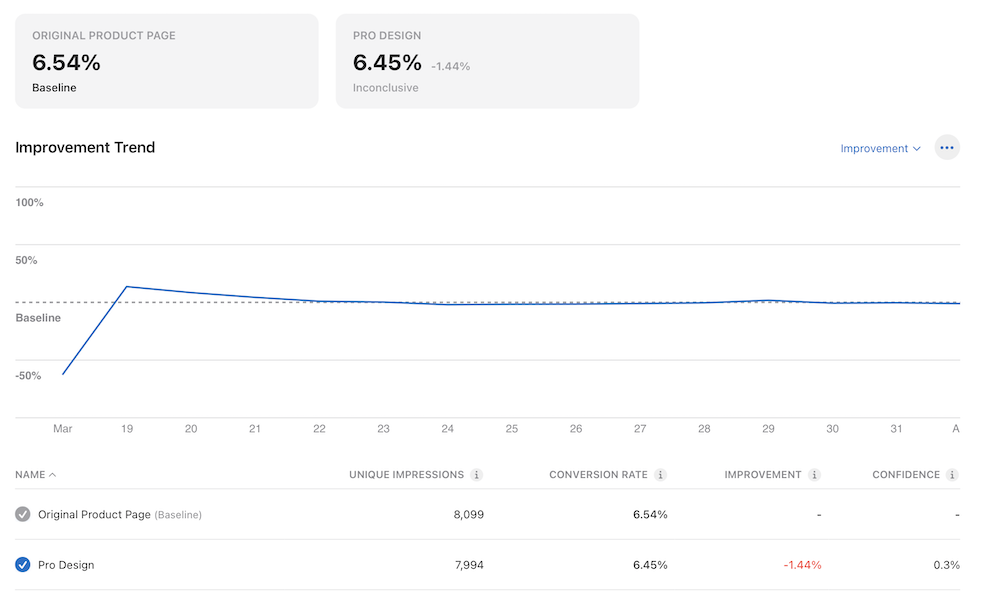
Ouch. I still liked parts of the design. The App Store did not. Another kill.
Test 4: Professional Advice vs ChatGPT
For the next test I tried two directions.
- One was a change the professional screenshot designer suggested.
- The other was an idea ChatGPT came up with to focus on the pain the user is feeling.
Human vs machine. Such science.
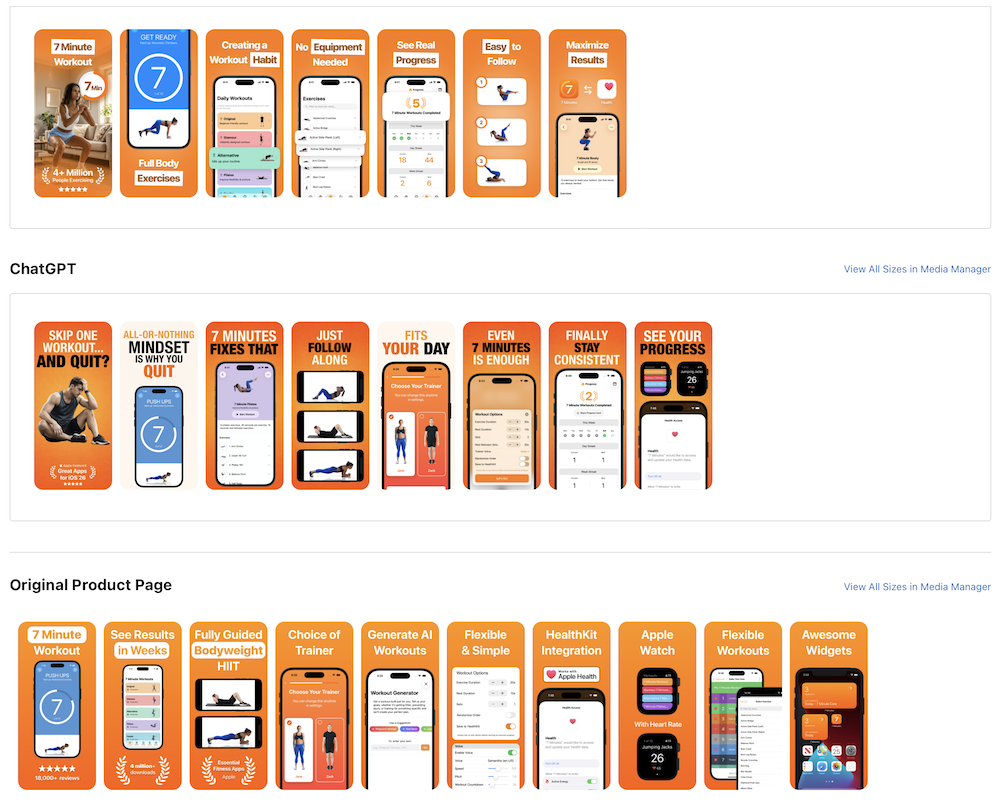
The professional version was slightly up at +2.40%. The ChatGPT idea was down, down, down -10.27%.
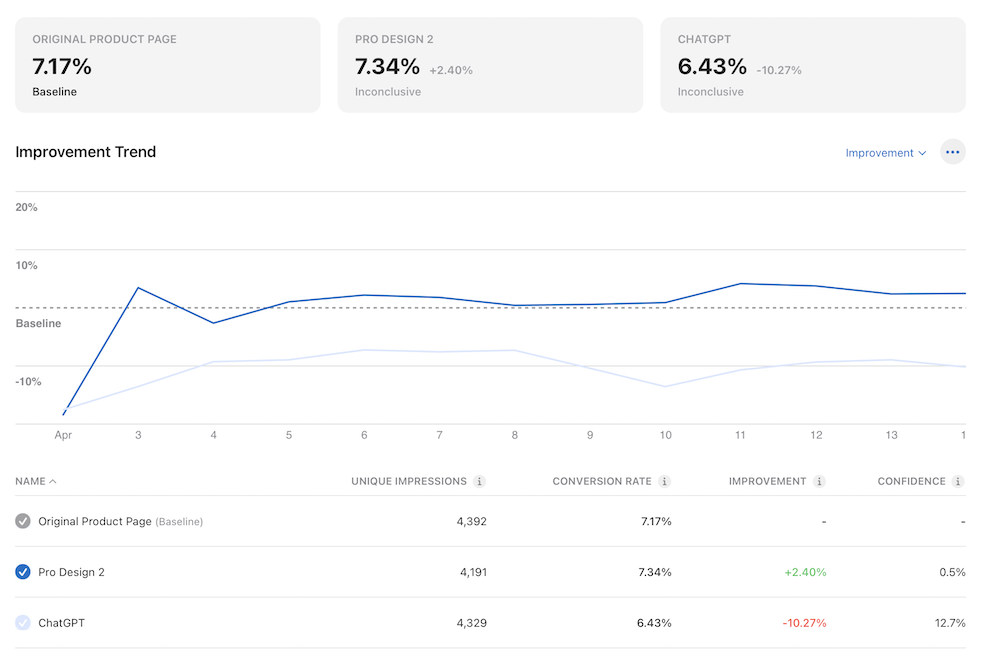
There is probably a more generous reading, but my takeaway was simple: AI can generate plenty of ideas, but the App Store still gets the final vote. This ChatGPT idea was a kill fast, real people didn't agree with its idea of pain.
Test 5: Current vs Professional vs My Photo Swap
The most recent test compares the current screenshots against the professional design, and the same professional design with a different first image I came up with.
This is the part of testing where I pretend one photo swap is definitely going to unlock growth.
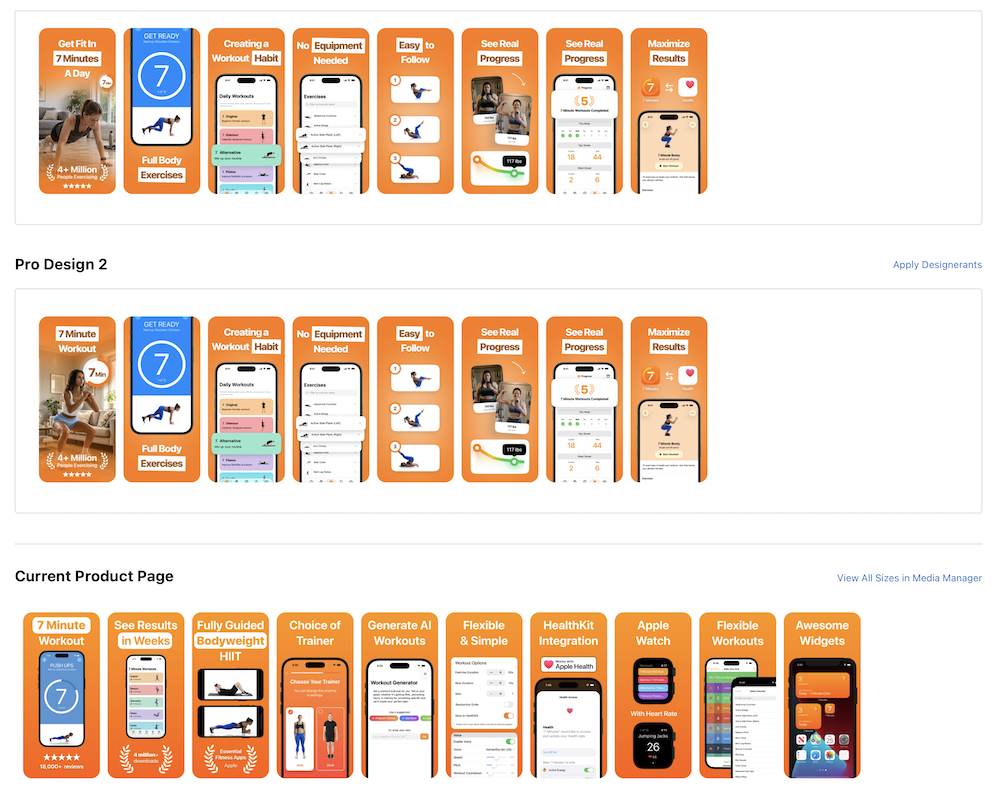
So far the professional version is +1.66% and the photo swap is +1.03%.
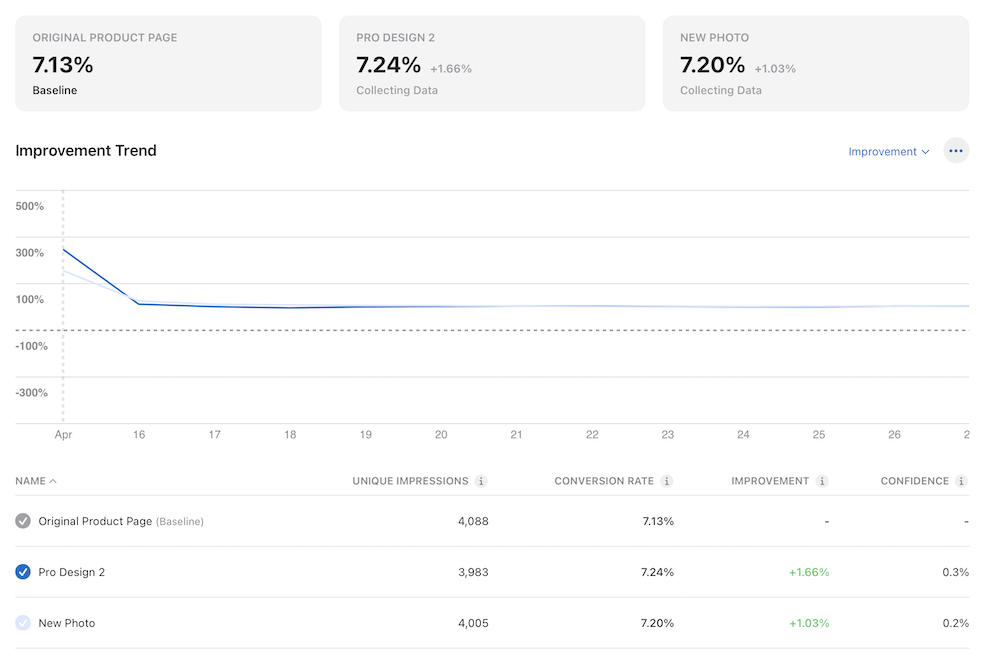
Yawn. I've left it running for now, but I don't expect much of a change based on my 2k rule.
What I’ve Learned
- Most screenshot changes don’t matter. It is surprisingly easy to make a nice looking set that does basically nothing.
- Bad ideas show up quickly. The big losses were obvious early.
- Trendy words can hurt. AI might be useful in the product, but that doesn’t mean it belongs in the first screenshots.
- Small wins are dangerous. +1% feels good in App Store Connect, but it is not worth weeks of waiting.
- Keep the queue moving. If the traffic is limited, speed matters more than statistical purity.
I still want a big screenshot win. I don’t think the answer is polishing one idea forever.
This is the kind of experimentation I love. Make a change, put it in front of real users, get punched in the face by the data, and then try again.
Next I’m going to try bigger swings. More aggressive first screenshots. Sharper promises. More emotional hooks.
If you have a screenshot idea, send it my way via one of the links in the footer. Especially if you think I’m missing something obvious. At this point the obvious ideas have been humbled enough that I’m very open to being wrong in public again.
If one of your ideas wins, I’ll include it in the next update.
Previous Posts
- An App Store Experiment
- An App Store Experiment - Part 2
- An App Store Experiment - Part 3
- An App Store Experiment - Part 4
- An App Store Experiment - Part 5 - The Finale
- The Resurrection
- Isolation, COVID-19 and the App Store
- Switching To Subscriptions
- Rebooting the App Store Experiment in 2026
One short email when I publish. No spam, unsubscribe anytime.